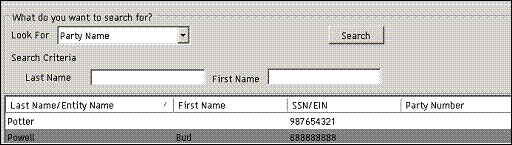
1. Select the Utilities tab in administration.
2. Select one of the following options in the left navigator.
n Delete Parties
n Delete Lending Transactions
n Delete Deposit Accounts
3. Enter search criteria and click the Search button.
4. Select the party(s) or lending transaction(s).
5. Click the Delete button.
n Parties are shared with lending and deposit accounts.
n Party records that are grayed out cannot be deleted because they are associated with a lending transaction, deposit account, or business entity that must be deleted first. ComplianceOne handles the creation of a party record in lending by automatically creating a lending transaction record behind the scenes. Thus, every party record is attached to a lending transaction record, which is evident when you attempt to delete a party record. By design, ALL party records are attached to a transaction, even if the lending transaction is not readily visible to you. Therefore, you must always first delete the lending transaction record tied to a party record before that party record can be deleted from the system. These ‘hidden’ transaction records are often easily identifiable in returned search results because typically, these transaction records will not have loan number or funding dates associated with them, and will have a loan amount of $0.00.
n Transactions that are grayed out cannot be deleted because they are on hold or locked. They must be unlocked or taken off hold before they can be deleted. Users should note that the system currently requires that the user who placed the transaction or account on hold also be the user that removes the hold from the transaction or account. This is true for both lending and deposit. Deposit accounts placed on hold require an additional step to clear the hold. To clear the hold you must recall the held transaction, take it off hold, and then reset the system to fully clear the hold.